This article details Red Hat's engineering efforts to support running a Oracle Database 19c on Red Hat OpenShift Virtualization. It provides a comprehensive reference architecture, validation results covering functionality, performance, scalability, and live migration, along with links to testing artifacts hosted on GitHub.
OpenShift Virtualization offers robust performance for demanding production workloads, such as Oracle databases, providing a viable virtualization alternative without sacrificing performance. This is especially for technology leaders, architects, engineering teams, and project managers involved in evaluating and adopting single-instance Oracle Database or Oracle RAC Database on OpenShift Virtualization.
The architecture design principles focus on resource allocation, partitioning, and abstraction layer optimization for compute, network, and storage. Performance tests using HammerDB with the TPC-C benchmark prove that Oracle Database can successfully run on OpenShift Virtualization with different storage solutions including software defined Red Hat OpenShift Data Foundation or traditional SAN storage dynamically provisioned via Pure/Portworx CSI driver. This article will also highlight observability and monitoring, using Prometheus and Grafana for infrastructure and Oracle-specific insights.
Background
Many customers are seeking virtualization alternatives without sacrificing performance. OpenShift Virtualization provides robust performance for demanding production workloads, including enterprise databases.
One of the most common components in traditional software architecture is the Oracle Database. To support customers interested in evaluating and adopting Oracle Database on OpenShift Virtualization, Red Hat has dedicated engineering resources to provide an optimized experience operating Oracle Database on OpenShift Virtualization.
This article assumes readers have an understanding of Red Hat OpenShift Container Platform. We do not intend to discuss the generic architecture of the Oracle Database, nor performance tuning. Instead, we will explain the architecture options for setting up and configuring OpenShift Virtualization to enable Oracle Database to achieve the best performance.
This post is intended for the following professionals involved in evaluating, validating, and deciding on the adoption of Oracle Database on OpenShift Virtualization:
- Technology leaders (e.g., VPs, CTOs): Stakeholders who are responsible to optimize ROI (Return on investment) and TCO (Total cost of ownership) of the day-to-day operations of running Oracle Database workloads in hybrid or on-premises cloud scenarios.
- Architects: Customer architects can review the reference architecture and test results to assess whether OpenShift Virtualization is a viable platform for hosting Oracle Database workloads in their organization. This article provides architectural requirements and enables architects to run independent validations.
- Engineering teams: Engineering teams can leverage the performance tests used by Red Hat during this evaluation, along with reusable artifacts available on GitHub, to accelerate their test setup and automation, streamlining the validation process.
- Project managers: Project managers can use the reference architectures to identify affected components and responsible teams. They can also use the standardized testing.
OpenShift Virtualization architecture overview
OpenShift Virtualization is the Red Hat implementation of the open source KubeVirt project. It is built on top of the standard OpenShift platform. A virtual machine (VM) runs within a containerized pod, OpenShift Container Platform manages VMs the same as it manages any pod, where a VM instance has access to the same platform services, including security, network, and storage like a regular container application. The only difference is the VM is managed directly at pod level unlike regular workload applications running inside containers.
Architecture components:
- Kernel-based virtual machine (KVM): The VM hypervisor on OpenShift is part of the Linux kernel.
- Virtual machine instance (VMI): Each VM represented by a VMI is created by QEMU using KVM to emulate hardware, QEMU creates user space level isolation.
- KubeVirt: Kubernetes add-on to manage VMs as Kubernetes resources, so that VMs will look like a pod.
virt-operator: Manages KubeVirt components installation and updates.virt-controller: Handles VM lifecycle management (e.g., restart on failure, scaling).virt-handler: A daemon on a KubeVirt enabled node to manage VMs on hosts using KVM/QEMU.virt-launcher: One per VM Pod, acts as the orchestrator that manages the QEMU/KVM virtual machine process inside the pod.- Custom Resources (CRs): Represents a VM definition, running a VM instance, and scheduling/policies.
- Pod wrapper: Serves as a wrapper for the QEMU process. VMI runs inside the Pod as a virtualized guest OS.
- Storage: OpenShift Virtualization supports a variety of storage solutions, including a variety of Kubernetes native options such as OpenShift Data Foundation, Portworx, and more traditional enterprise solutions such as iSCSI, Fibre Channel (FC) SAN storage, and others. The Kubernetes native storage solution, OpenShift Data Foundation, built on the open source Ceph project, delivers scalable, redundant storage with an abstraction layer optimized for Kubernetes environments. OpenShift Data Foundation also supports dynamic provisioning of persistent volumes (PVs) and persistent volume claims (PVCs), simplifying storage management.
For this Oracle Database validation project, we will consider multiple storage alternatives. However, OpenShift Data Foundation will be the primary focus within the scope of this document due to its seamless integration with Kubernetes. When deploying Oracle Database workloads, it is important to evaluate and select the storage solution that best meets your performance requirements and operational needs.
Network: VMs access network via Multus (CNI meta-plugin) or Single Root I/O Virtualization (SR-IOV), where Multus is defined at the pod level.


Oracle Database design principles
When an Oracle Database runs on a virtualized operating system, the VM is responsible for ensuring the database receives adequate system resources to operate efficiently and remain resilient. Since real-world infrastructure resources are limited, the infrastructure architecture must be carefully designed to balance resource allocation and accommodate the varying demands of different workloads.
A common architectural approach to boost Oracle Database performance at the infrastructure level includes the following principles:
- Resource location: Allocate sufficient resources in terms of compute, storage and network to eliminate bottlenecks.
- Resource partitioning: When resources are limited, partition resource requirements and implement tailored solutions to meet specific needs.
- Abstraction layer optimization: Avoid unnecessary or low-value abstraction layers in exchange flexibility for performance gains.
Oracle Database relies heavily on three primary types of system resources:
- Compute: This includes vCPUs, IOThreads, memory, and the ability to scale across nodes.
- Network: Oracle Database is highly sensitive to I/O performance. Client access and storage access have distinct throughput and latency requirements. As a result, Oracle Database architectures often use separate networks for different types of traffic.
- Storage: Redo logs, data files, and backups have different read/write performance needs. Whenever possible, you should place these on separate physical storage to ensure optimal I/O performance.
OpenShift Virtualization offers the capabilities and flexibility needed to support various approaches for resource allocation based on system resource partitioning needs.
Reference architecture
This section discusses architecture considerations and solution options in Oracle Database on OpenShift Virtualization design.
Compute
Ensure Oracle Database has sufficient computation resources, that OpenShift Virtualization platform provides direct control over:
- Configuring the vCPU and RAM allocation for resource vertical scaling.
- OpenShift Virtualization cluster extensibility for horizontal scalability.
- Control of VM IO Thread count allocation to eliminate pod level I/O bottleneck.
- Avoid overcommitting resources for virtual machines hosting Oracle Database workloads allocating more virtualized CPUs or memory than there are physical resources on the system.
Network
Oracle Database traffic has different performance requirements in terms of network latency, throughput, and reliability. OpenShift Container Platform pod Multus is a capability to partition network traffic and mediate multiple network protocols. Consider the following:
- Implementing different network paths for OpenShift OVN-Kubernetes, storage, and virtual machines.
- For Oracle RAC Database installations, further segregate network traffic for RAC instance-to-instance interconnect communication, and “public” network communication.
- For mission critical workloads sensitive to latency and throughput, consider leveraging SR-IOV for virtual network interfaces creating a direct path from VM to underlying physical resources.
Storage
As previously mentioned, OpenShift Virtualization supports a wide range of storage solutions, from Kubernetes-native options like OpenShift Data Foundation and Portworx to traditional enterprise systems such as iSCSI and Fibre Channel (FC) SAN. This flexibility allows users to choose storage that best fits their performance and operational needs.
While there is no universal rule in selecting appropriate storage option, the following principles could be used as guidelines:
- Balance between the need for operational flexibility (ease of provisioning, integration with platform) and performance (IO latency, throughput) requirements.
- Support for multi-write option (shared volume between two or more VMs) that may be required for Oracle RAC Database.
Hardware configuration
The design of the initial performance tests has been scoped to a set of hardware resources available today.
Clusters specification:
- Cluster 1 (primary)
- 4 x Dell R660 servers
- 128 CPU threads (2 sockets of Intel Xeon Gold 6430 )
- 256 GB memory
- 2x 480 GB root disk
- 4x 1.6 TB NVME drives
- 4 x 25Gbps Broadcom NIC
- 2 x 25Gbps Intel 810 NIC
- 2 x 32Gbps QLogic 2772 Fiber Channel HBA
- 4 x Dell R660 servers
- Cluster 2
- 4x PowerEdge R6715 servers
- 256 CPU threads (1 socket of AMD EPYC 9745)
- 1.5 TB memory
- 480GB root disk
- 4x 1.6 TB NVME drives
- 2x 100Gbps Broadcom NIC
- 4x PowerEdge R6715 servers
The complete, in-depth testing and analysis of configuration options was performed using Cluster 1 (4 x PowerEdge R660). However, we also conducted ad-hoc baseline testing with AMD EPYC CPU hardware backed by the Red Hat OpenShift Data Foundation storage to check for compatibility and performance differences. These baseline results, utilizing Red Hat OpenShift Data Foundation storage, showed performance was the same or higher than the R660 cluster, a result attributed to the AMD cluster's higher-tier hardware.
OpenShift Virtualization configuration
While the default configuration for OpenShift Virtualization and OpenShift Data Foundation storage provides reasonable performance, further configuration changes have been made to optimize the test platform for IO-intensive workload typical for databases:
- Configured OpenShift Data Foundation to use a performance profile.
- Configured OpenShift Data Foundation and OpenShift Virtualization to separate out OpenShift Data Foundation storage traffic from general Software Defined Network (OpenShift Container Platform SDN/OVN-Kubernetes) traffic. (Chapter 8. Network requirements | Planning your deployment | Red Hat OpenShift Data Foundation | 4.18)
- Segregated traffic for virtual machines (Oracle Database and HammerDB test harness) from OpenShift Data Foundation storage and OpenShift Container Platform OVN-Kubernetes using separate physical network interfaces. To reduce latency and increase throughput, network interfaces introduced to affected virtual machines are using Single Root I/O Virtualization (SR-IOV) (Figure 2).
Cluster specification:
- OpenShift version: 4.18.9
- OpenShift Virtualization: Enabled via OperatorHub
- Nodes:
- 3 x Hybrid (Control Plane/ Worker/ Storage) nodes
- 1 x Worker node
- Networking (specific to Oracle Database VMs):
- LACP bond with 4 Broadcom 25Gbps NICs partitioned to segregate OpenShift OVN-Kubernetes, OpenShift Data Foundation storage client, OpenShift Data Foundation storage replication traffic.
- Two Intel x810 25GB NICs for virtual machine traffic with two different subnets (Public and Private) configured to be presented to virtual machines using SR-IOV.
Storage (specific to Oracle Database VMs):
OpenShift Container Platform has been configured with two types of storage - Kubernetes native OpenShift Data Foundation, Pure Storage Flash Array
- OpenShift Data Foundation storage (backed by 4x 1.5 TB NVMe drives) configured with a performance profile and using a separate storage network.
- Pure Storage FlashArray FA-C50R4 provisioned using Portworx Enterprise operator (version 25.3.1)


Oracle Database configuration
Virtual machines to host the Oracle Database are moderately sized to avoid overcommitment of resources and to compare results of testing on different hardware options. The Oracle Database has not been specifically tuned for the Transaction Processing Performance Council Benchmark C (TPC-C) test and largely uses a default configuration with exception of the few common tuning changes based on best practices.
We selected tuning parameters based on the size of the virtual machine, specifics of the benchmark test workload, and monitoring information. We assessed the effectiveness of each change by comparing test results with baseline numbers. Oracle Database configuration could be further optimized following recommendations from Database Performance Tuning Guide.
Tests have been performed using two different types of shared storage - OpenShift Data Foundation and Fiber Channel Pure Storage FlashArray.
Figure 3 shows that the Oracle Database and HammerDB client access were on the same network. Data volumes for virtual machines are configured to preallocate disk space to improve write operations.
Oracle Database Single Instance

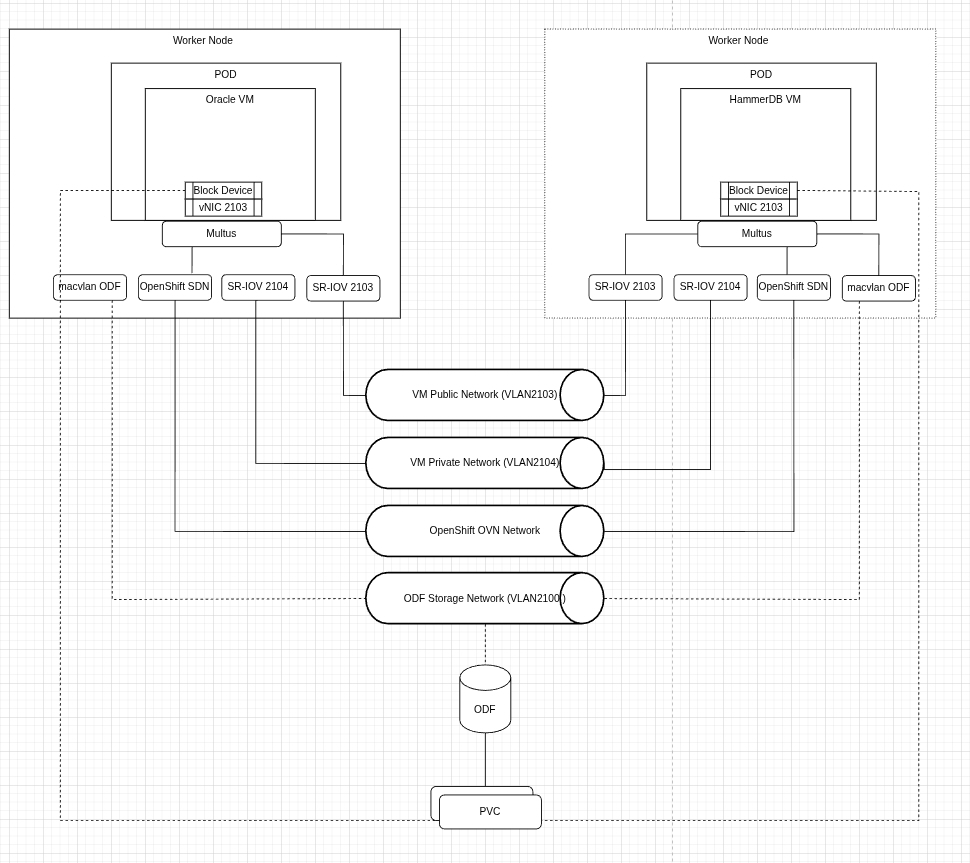
We have performed separate ad-hoc tests to assess the impact of storage on the performance of the database by adding NVMe storage using a local storage operator.
Virtual machine specification:
- OS: RHEL 8.10
- VM Count: 1
- vCPU: 16
- Memory: 48GB
- Storage: 250GB (Root and DB Data residing on the same volume) as block device from RH ODF
- DataVolume: Created using “preallocation: true” (thick provisioning).
- Networking: Connected to public subnet using SR-IOV.
Oracle Database setup:
Oracle Database version: 19c Enterprise Edition with Release Update 26 (version 19.26)
- The database is set up with a filesystem as the target for data files (root volume with OpenShift Data Foundation backed storage) using OMF (Oracle Managed Files).
- To ensure compatibility of the test with future versions of Oracle Database, the database has been created using the Container Database (CDB) architecture.
- Memory allocation used totalMemory of 32GB as input for the DB creation wizard (allowing Oracle Database installation to automatically assess SGA/PGA split).
- Additional tuning parameters:
- 4 Data files manually extended to 32GB
- REDO log size adjusted to 4GB
- 4 REDO log disk groups
- FILESYSTEMIO_OPTIONS: SETALL (allowing asynchronous IO and direct IO)
- USE_LARGE_PAGES: AUTO (to optimize CPU usage for large SGA size)
Note: For the performance tests with NVME backed storage, a separate filesystem has been mounted using NVME device and assigned as target destination for datafiles.
Oracle RAC database
Two Oracle RAC instances are hosted on two separate worker nodes with identical configuration. Due to the hardware constraints, neither Oracle specific system resources nor resource access is partitioned, all traffic for storage I/O, HammerDB client interactions, and RAC interconnect communications share the same communication bridge. The storage class for the persistence volume uses the default setting.

Virtual Machine Configuration
- OS: RHEL 8.10
- VM Count: 2
- vCPU: 24
- Memory: 64GB
- Storage:
- OS Root disk (also Oracle binaries): 100 GB
- 3 x Shared Volumes (1 CSR, 1 Data, 1 Fast Recovery):250GB
- Networking: 2 virtual NICs (Public Subnet and Private Subnet ) connected via SR-IOV
Oracle Database setup:
- Software versions:
- Oracle Grid Infrastructure 19c with Release Update 26 (version 19.26)
- Oracle Database 19c Enterprise Edition with Release Update 26 (version 19.26)
- Memory allocation used totalMemory of 42GB as input for the DB creation wizard (allowing Oracle Database installation to automatically assess SGA/PGA split).
- Storage provided using Oracle Automatic Storage Management (ASM) Disks with ASM Filter Driver kernel modules.
- Three disk groups were provisioned using ASM :
- OCR - for Oracle Cluster Registry and Oracle Clusterware files
- DATA - datafiles for RAC database
- REC - for Fast Recovery Area
All disk groups using External redundancy type (Oracle ASM does not provide redundancy on Oracle level)
- Additional tuning parameters:
- 4 Data files manually extended to 32GB
- REDO log size adjusted to 4GB
- 8 REDO log disk groups (4 for each thread/instance)
- USE_LARGE_PAGES: AUTO (to optimize CPU usage for large SGA size)
Observability and monitoring
OpenShift offers a powerful, integrated observability platform that consolidates monitoring across both infrastructure and application layers. It natively supports metrics collection, logging, and alerting, and can be extended to include observability data from external applications like Oracle Databases. This unified approach reduces operational complexity while enabling end-to-end visibility.
Observability for OpenShift Virtualization is seamlessly integrated into the same platform, allowing you to monitor virtual machines, system resources, and workloads (i.e., Oracle Databases within a single, consistent monitoring stack).
The Oracle Database Observability Exporter, deployed within OpenShift, collects Oracle Database performance metrics and metadata, which are exposed to Prometheus. Grafana visualizes these metrics, providing real-time dashboards to detect abnormal patterns, resource pressure, and performance issues across Oracle Database and VM layers.
To enhance database-level analysis, you can leverage HammerDB during performance testing to capture snapshots and generate AWR (Automatic Workload Repository) reports. When combined with metrics from Prometheus and Grafana, these reports provide a richer, multidimensional understanding of workload behavior and potential bottlenecks.
Additionally, Oracle Database Enterprise Manager serves as a complementary tool, offering detailed diagnostics and specialized monitoring capabilities tailored to Oracle Databases. Used alongside OpenShift’s unified observability platform, it ensures comprehensive coverage for infrastructure and Oracle Database specific operational insights.


Figure 5 shows a sample Grafana dashboard deployed as part of the observability and monitoring setup for the OpenShift Virtualization platform.


Figure 6 shows a sample Oracle Database Grafana dashboard deployed on the OpenShift Virtualization platform.


Figure 7 shows a sample Oracle Database Grafana dashboard deployed on the OpenShift Virtualization platform.
System performance evaluation
The performance test was designed to measure database transaction throughput and query latency for OLTP (Online Transaction Processing) workloads. We used HammerDB, open source database performance testing software to simulate OLTP workloads using the TPC-C benchmark against the single-instance Oracle Database with the previously mentioned system details. The TPC-C test simulates a real-world order management system, with a mix of 80% write operations and 20% read operations, including high-frequency customer orders, payments, inventory checks, and batch deliveries. The test execution involves HammerDB generating TPC-C workloads on Oracle Database within OpenShift Virtualization.


Test coverage summary
With HammerDB test harness, the scale-run profile was configured to simulate meaningful workloads with virtual user counts 20, 40, 60, 80 and 100, using 500 warehouses with each test run for 20 minutes with a ramp-up period of 3 minutes. We designed this setup to reflect realistic production scenarios and to evaluate the system’s performance under scaled transactional loads.
Full set of tests was executed against following Oracle Database configurations:
- Oracle Database Single instance
- Virtual machine configured with virtual disk backed OpenShift Data Foundation
- Virtual machine configured with virtual disk backed by volumes from Pure Storage FlashArray using Fiber Channel
- Ad-hoc test with NVME disk provisioned via Local Storage operator
- Oracle RAC Database
- Virtual machines configured with virtual disk backed OpenShift Data Foundation
- Virtual machines configured with virtual disk backed by volumes from Pure Storage FlashArray using Fiber Channel
Based on the reference architecture configuration, the test results showed strong New Orders Per Minute (NOPM) and Transactions Per Minute (TPM) metrics for the single-instance Oracle Database with OpenShift Data Foundation and Fiber Channel PureStorage storage solutions. Our tests show that configuration with Fiber Channel storage had higher throughput measured in transactions per minute compared to OpenShift Data Foundation with improvement of approximately 26 percent. TPM for setup with directly attached NVME drive was not substantially different from the Fiber Channel based storage solution. Oracle RAC database has not performed well with shared disks backed by OpenShift Data Foundation storage. Overall TPM was lower compared to single instance Oracle Database with a significant proportion of CPU cycles spent on IO waits during runs. Test runs with fiber channel based storage showed improvement of 83 percent compared to OpenShift Data Foundation storage.
Tests on servers with higher capacity (Cluster 2) have shown improvement in throughput with Red Hat OpenShift Data Foundation storage for Oracle Single Instance database by approximately 20% . While tests with Oracle RAC database have shown similar improvements in performance numbers it still fallen short to the throughput with FC SAN based storage.
Evaluation of impact of VM Live Migration
As the ability to migrate virtual machines running database workloads from one OpenShift node to another is an important functionality of any virtualization platform, we have conducted a separate set of the tests to assess impact of virtual machine Live Migration on stability of the Oracle Database and performance.
For the Live Migration test we have used Swingbench load generator running TPC-C benchmark tests. Swingbench was selected due to better reporting capabilities on individual transaction level compared to Hammer DB. Database schema was populated with seed data to have similar size as with tests done with Hammer DB.
Each live migration test was done without load before and during the migration and with the load of 100 virtual users performing transactions. No additional configuration changes were done on OpenShift Virtualization platform level to optimize performance of Live Migration framework.
For single instance Oracle Database live migration took on average 1-2 minutes without significant difference between migration of virtual machine with idle database and under the load. During migration no failed or rolled back transactions have been reported but TPM (transactions per minute) metrics went down for brief moment recovering to the original level after completion of migration
Migration for one of the nodes of the Oracle RAC cluster took around 3 minutes. At the same time due to the brief pause in network communication during transition to a different SR-IOV interface, Oracle RAC High Availability services noticed loss of heartbeat through the interconnect associated network interface and initiated a failover process of Oracle RAC services to unaffected nodes. While there were no failed transactions, the TPM level has fallen for a period of time . After completion of the live migration Oracle RAC has initiated recovery and restored the original level of redundancy of nodes.
Final thoughts
OpenShift Virtualization is a feasible and a viable platform to deploy Oracle Database 19c workloads. The ease of setting up OpenShift Virtualization offers robust support for creating virtual machines. Considering these factors, OpenShift Virtualization stands as a serious contender and alternative to competing virtualization technologies offerings. The current performance validation of Oracle Database 19c demonstrates enterprise grade performance on OpenShift Virtualization platform.
Through testing with different storage options, we assessed the impact of high-performance storage options and found strong indications that upgrading to high-performance storage solutions like FC SAN may significantly improve overall performance. While single instance Oracle Database performed well with Kubernetes native OpenShift Data Foundation storage providing reduced operational cost, scalability and reliability, for demanding workloads running on Oracle RAC Databases FC SAN solution is recommended.
For high-performance workloads, consider:
- High-performance storage options such as FC SAN for Oracle Database data files and redo logs to optimize performance.
- Segment network for virtual machines, OpenShift OVN-Kubernetes and storage network preferably using separate physical devices on OpenShift Virtualization nodes.
- For Oracle RAC Databases consider further use of separate physical devices for the private virtual network interfaces used by interconnect component.
- SR-IOV (Single Root I/O Virtualization), if supported by hardware to optimize performance of virtual network interfaces of virtual machines hosting Oracle Database workload.
- HugePages with the Oracle Database setting
USE_LARGE_PAGESbased on your workload requirements: This configuration adjusts the memory page size, recommended for improved performance, especially when working with SGAs larger than the default settings.
You can find HammerDB test scripts in this GitHub repository.
The oracle-db-appdev-monitoring GitHub project aims to provide observability for the Oracle Database so users can understand performance and diagnose issues easily across applications and databases. Read the instructions to set up the project on the OpenShift platform.
Product trial
Red Hat Learning Subscription | Product Trial
About the authors

Browse by channel

Automation
The latest on IT automation for tech, teams, and environments

Artificial intelligence
Updates on the platforms that free customers to run AI workloads anywhere

Open hybrid cloud
Explore how we build a more flexible future with hybrid cloud

Security
The latest on how we reduce risks across environments and technologies

Edge computing
Updates on the platforms that simplify operations at the edge

Infrastructure
The latest on the world’s leading enterprise Linux platform

Applications
Inside our solutions to the toughest application challenges

Virtualization
The future of enterprise virtualization for your workloads on-premise or across clouds
